Lecture: Data Quality Check and Cleaning
Actuarial Data Science - Open Learning Resource
Visualising Distributios: Categorical Variables
- To examine the distribution of a categorical variable, use a bar chart
- Data:
diamonds(see?diamondsfor details)
See also: Covariation

Visualising Distributions: Continuous Variables
- To examine the distribution of a continuous variable, use a histogram

Exercise: Histogram Bin Widths
- Plot a histogram of diamonds with size less than 3 carats (using
filter()), and use a smaller binwidth of 0.1.

Exercise: Frequency Polygons by Group
- Overlay multiple histograms in the same plot by
cutusinggeom_freqpoly()

See also: Covariation
Example: Interpreting a Histogram
Question:
Look at the histogram below. What questions can you ask?

Unusual Values (Outliers)
- Outliers are observations that are unusual; data points that do not seem to fit the overall pattern
- Sometimes outliers are data entry errors; other times they may reveal important insights
- When you have a large dataset, outliers can be difficult to see in a histogram

Visualising Outliers
- To make unusual values easier to see, we can zoom in using
coord_cartesian(), often together withylim()orxlim(), to restrict the axis ranges.

A Categorical and a Continuous Variable
- Explore the distribution of a continuous variable across levels of a categorical variable
- Use
geom_freqpoly()(e.g. see frequency polygon example) - It can be difficult to compare distributions when overall counts differ substantially (e.g. see distribution of cut example).
- Instead of displaying counts, we can display density, where the area under each curve is standardised to one

Boxplot
- Another way to display the distribution of a continuous variable across categories is a boxplot.
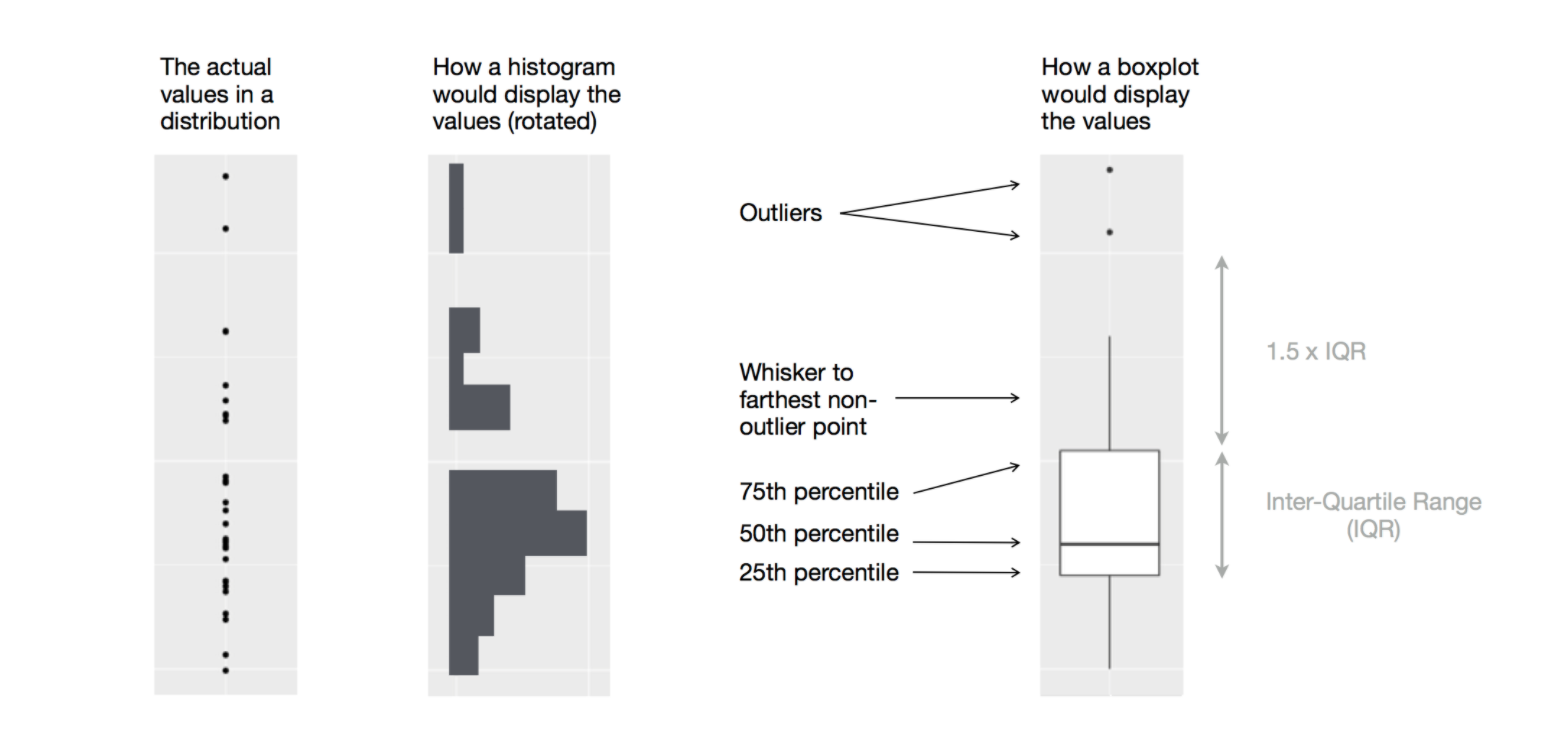
Diagram illustrating how a boxplot is constructed (Source: R for Data Science (Wickham, Çetinkaya-Rundel, and Grolemund 2023))
Example: Diamond Prices by Cut
- Examine the distribution of diamond prices by
cut. What do you observe?

- This suggests the counterintuitive finding that higher-quality diamonds are cheaper on average. Why might this be the case?
Example: Highway Mileage by Vehicle Class
- Consider the
mpgdataset. We want to understand how highway mileage (hwy) varies across vehicle classes (class) - To make patterns easier to see, reorder
classby the median ofhwyusingreorder(..., FUN = median) - For long variable names,
geom_boxplot()may be clearer when flipped usingcoord_flip()

Two Categorical Variables
- To visualise covariation between categorical variables, count the number of observations for each combination.
- One approach is to use
geom_count()

Example: Visualising Counts with geom_tile()
- Then visualise the counts using
geom_tile()with the fill aesthetic

Two Continuous Variables
- A common way to visualise the covariation between two continuous variables is a scatter plot using
geom_point() - Covariation appears as patterns in the points
- Example: visualise the relationship between carat size and price of diamonds

Example: Add Transparency

References

Wickham, Hadley, Mine Çetinkaya-Rundel, and Garrett Grolemund. 2023. R for Data Science: Import, Tidy, Transform, Visualize, and Model Data. 2nd ed. O’Reilly Media.