Tibbles
Tibbles
We work with “tibbles” instead of R’s traditional data.frame in the tidyverse environment.
The tibble package provides opinionated data frames that make working in the tidyverse easier.
See vignette("tibble") for more information.
This lecture focuses on data quality: how to store your data in a tidy, convenient format, and how to identify and fix common data issues before they silently undermine your analysis. The aim is that by the end, you feel more confident trusting the datasets you work with, or at least knowing when you should not trust them yet.
#install.packages("tidyverse") library (tidyverse)
-- Attaching core tidyverse packages ------------------------ tidyverse 2.0.0 --
v dplyr     1.1.4     v readr     2.1.4
v forcats   1.0.0     v stringr   1.5.0
v ggplot2   3.4.4     v tibble    3.2.1
v lubridate 1.9.3     v tidyr     1.3.0
v purrr     1.0.2
-- Conflicts ------------------------------------------ tidyverse_conflicts() --
x dplyr::filter() masks stats::filter()
x dplyr::lag()    masks stats::lag()
i Use the conflicted package (<http://conflicted.r-lib.org/>) to force all conflicts to become errors
Creating Tibbles
Convert a data frame to a tibble: as_tibble()
Create tibbles: tibble()
Use non-syntactic names with backticks
tribble(): create tibbles in a transposed format
Example: Converting to a Tibble
Example: Creating a Tibble
tibble (x = 1 : 5 , y = 1 , z = x ^ 2 + y
Example: Creating Tibbles with Special Names
tibble (` :) ` = "smile" , ` ` = "space" ,` 2000 ` = "number" tribble (~ x, ~ y, ~ z,#--|--|---- "a" , 2 , 3.6 ,"b" , 1 , 8.5
Pipe Data using %>%
Use %>% to emphasise a sequence of actions rather than the object being acted on
Pronounce %>% as “then” when reading code
No need to create intermediate objects
%>% should always have a space before it and is usually followed by a new line.
%>% group_by (Species) %>% summarise (Sepal.Length = mean (Sepal.Length),Sepal.Width = mean (Sepal.Width),Species = n_distinct (Species)
Tibble vs. Data Frame
tibble() does less:
it never changes the type of the inputs (e.g. it does not convert strings to factors)
it never changes variable names
it never creates row names
Printing
tibbles show only the first 10 rows
each column reports its type
use print() to display more rows (n) and columns (width)
Subsetting
extract a single variable using $ (by name) or [[ ]] (by name or position)
within a pipe %>%, use the special placeholder .
Tidy Data
Tidy Data
The same data can be organised in different ways.
Tidy data is easier to work with.
There are three interrelated rules that make a dataset tidy:
Each variable has its own column
Each observation has its own row
Each value has its own cell
Practical guidelines:
Store each dataset as a tibble
Store each variable in its own column
dplyr, ggplot2, and other tidyverse packages are designed to work with tidy data
Pivoting: Longer
A common problem occurs when column names represent values rather than variables.
Example: table4a
Column names (1999, 2000) represent values of the year variable
Values in these columns represent values of the cases variable
Each row represents two observations, not one
#table4a %>% pivot_longer (cols = c (` 1999 ` , ` 2000 ` ), names_to = "year" , values_to = "cases" )
Pivoting: Wider
pivot_wider() is the opposite of pivot_longer()Use it when a single observation is spread across multiple rows.
Example: table2
Each observation is a country in a given year
Data for each observation is spread across multiple rows
%>% pivot_wider (names_from = type, values_from = count)
Separating
table3 has a different problem: one column (rate) contains two variables (cases and population).separate() splits one column into multiple columns, by splitting wherever a separator character appears.By default, separate() splits values at non-alphanumeric characters (i.e. characters that are not numbers or letters).
Use the sep argument to specify a custom separator.
Example: Using separate()
%>% separate (rate, into = c ("cases" , "population" ), sep = "/" )#table3 %>% # separate(rate, into = c("cases", "population"), sep = "/", convert=TRUE) #table3 %>% # separate(year, into = c("century", "year"), sep = 2)
Unite
unite() is the inverse of separate(): it combines multiple columns into a single columnBy default, it places an underscore (_) between values from different columns
If no separator is desired, use sep = ""
%>% unite (new, century, year)#table5 %>% # unite(new, century, year, sep = "")
Missing Values
A value can be missing in one of two ways:
Explicitly : represented by NA – the presence of an absence Implicitly : not recorded in the dataset – the absence of a presence
<- tibble (year = c (2015 , 2015 , 2015 , 2015 , 2016 , 2016 , 2016 ),qtr = c ( 1 , 2 , 3 , 4 , 2 , 3 , 4 ),return = c (1.88 , 0.59 , 0.35 , NA , 0.92 , 0.17 , 2.66 )
Making Implicit Missing Values Explicit
Use pivot_wider()
Use complete()
%>% pivot_wider (names_from = year, values_from = return)#stocks %>% # complete(year, qtr)
Making Explicit Missing Values Implicit
Set values_drop_na = TRUE in pivot_longer() to convert explicit missing values into implicit ones
%>% pivot_wider (names_from = year, values_from = return) %>% pivot_longer (cols = c (` 2015 ` , ` 2016 ` ), names_to = "year" , values_to = "return" , values_drop_na = TRUE
Filling Missing Values with fill()
fill() replaces missing values with the most recent non-missing value (also known as last observation carried forward).
<- tribble (~ person, ~ treatment, ~ response,"Derrick Whitmore" , 1 , 7 ,NA , 2 , 10 ,NA , 3 , 9 ,"Katherine Burke" , 1 , 4 %>% fill (person)
Assessing Data Quality
Common Data Issues
Missing data
Irregular data and outliers
Uninformative data
Censored and truncated data
High cardinality features
Imbalanced data
Missing Data
Understand why values are missing
Distinguish between structurally missing values and other types
e.g. the number of children a man has given birth to
Informative missingness : the pattern of missing data is related to the outcome
e.g. in a drug study, side effects are so severe that patients drop out
Handling Missing Values
Include a missing indicator (dummy variable)
useful when the pattern of missingness is informative
Some models can handle missing data (e.g. tree-based methods)
Many models cannot handle missing values
linear models, neural networks, SVMs
Remove observations or variables as a last resort
may be feasible for large dataset
Impute missing values
Imputing Missing Values
Use information from other predictors in the training data to estimate missing values
simple methods: mean, median or mode
model-based methods: e.g. k-nearest neighbours
Imputation is extensively studied in the statistical literature for inference, but is often less critical in predictive modelling
Irregular Data and Outliers
Detection:
Descriptive statistics
Visualisation (e.g. boxplots, scatter plots)
Outlier detection methods
Handling:
Data validation: ensure there are no recording errors
Remove or adjust values
Outliers may belong to a different population
Use models that are robust to outliers (e.g. tree-based methods, SVMs)
Apply transformations to reduce the impact of outliers, such as the spatial sign transformation
each observation is scaled by its norm
Example: Outliers
Censored data
The value of an observation is only partially known
For interpretation or inference
Typically handled using formal methods with assumptions about the censoring mechanism
For prediction
Often treated as missing data or the censored value is used as observed
General insurance (policy limits); life insurance (age groups of mortality data)
High-Cardinality Features
Categorical predictors with many unique levels
Examples: postcodes, medical condition codes, or similar variables
Imbalanced Data
Imbalance between classes (e.g. control vs treatment) can cause modelling issues
Construct a balanced training set to improve model performance
Undersampling : reduce the number of observations in the majority classOversampling : generate additional observations in the minority class
Data Validation
Validate data against external sources and previous datasets
Consult domain experts or data providers to assess data quality
Exploratory Data Analysis (EDA)
Exploratory Data Analysis
Generate questions about your data
Search for answers by visualising, transforming, and modelling your data
Use what you learn to refine your questions and/or generate new ones
We combine dplyr and ggplot2 to interactively ask questions, answer them with data, and then ask new questions
Two types of questions are especially useful for making discoveries in your data:
What type of variation occurs within variables?
What type of covariation occurs between variables?
Adapted from Wickham, Çetinkaya-Rundel, and Grolemund (2023 ) , see Chapter 10 of R for Data Science
Variation
Variation is the tendency of the values of a variable to change from measurement to measurement.
Variables:
Continuous variable: can take any value within a range of possible values
Categorical variable: takes one of a fixed set of values
Visualising Distributios: Categorical Variables
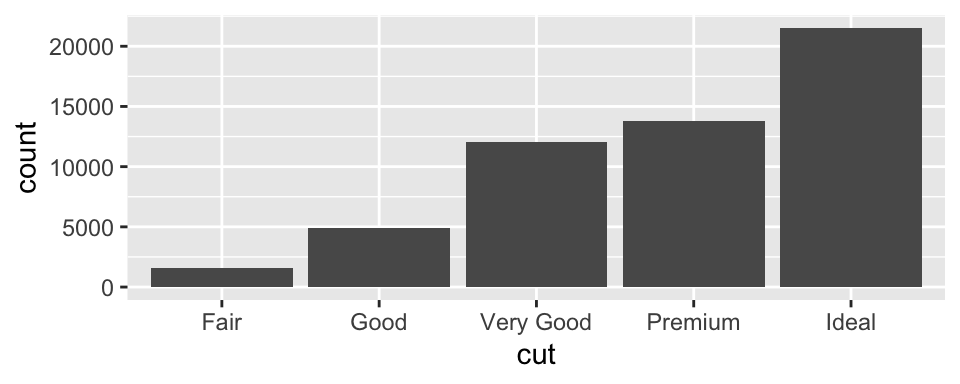
To examine the distribution of a categorical variable, use a bar chart
Data: diamonds (see ?diamonds for details)
See also: Covariation
ggplot (data = diamonds) + geom_bar (mapping = aes (x = cut))#diamonds %>% # count(cut)
Visualising Distributions: Continuous Variables
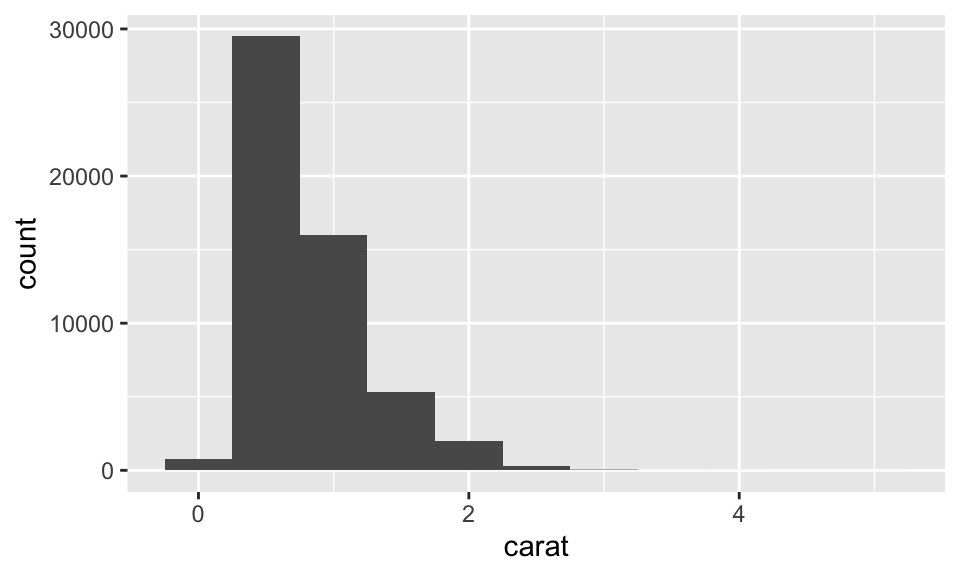
To examine the distribution of a continuous variable, use a histogram
ggplot (data = diamonds) + geom_histogram (mapping = aes (x = carat), binwidth = 0.5 )#diamonds %>% # count(cut_width(carat, 0.5))
Exercise: Histogram Bin Widths
Plot a histogram of diamonds with size less than 3 carats (using filter()), and use a smaller binwidth of 0.1.
<- diamonds %>% filter (carat < 3 )ggplot (data = smaller, mapping = aes (x = carat)) + geom_histogram (binwidth = 0.1 )
Exercise: Frequency Polygons by Group
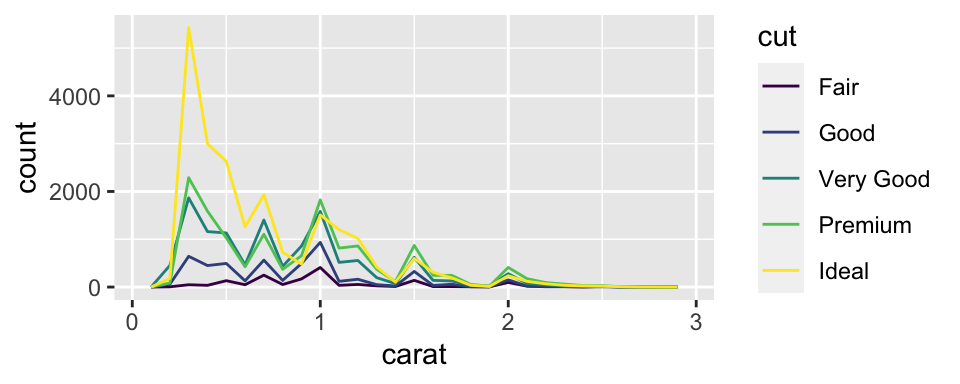
Overlay multiple histograms in the same plot by cut using geom_freqpoly()
ggplot (data = smaller, mapping = aes (x = carat, colour = cut)) + geom_freqpoly (binwidth = 0.1 )
See also: Covariation
Typical Values
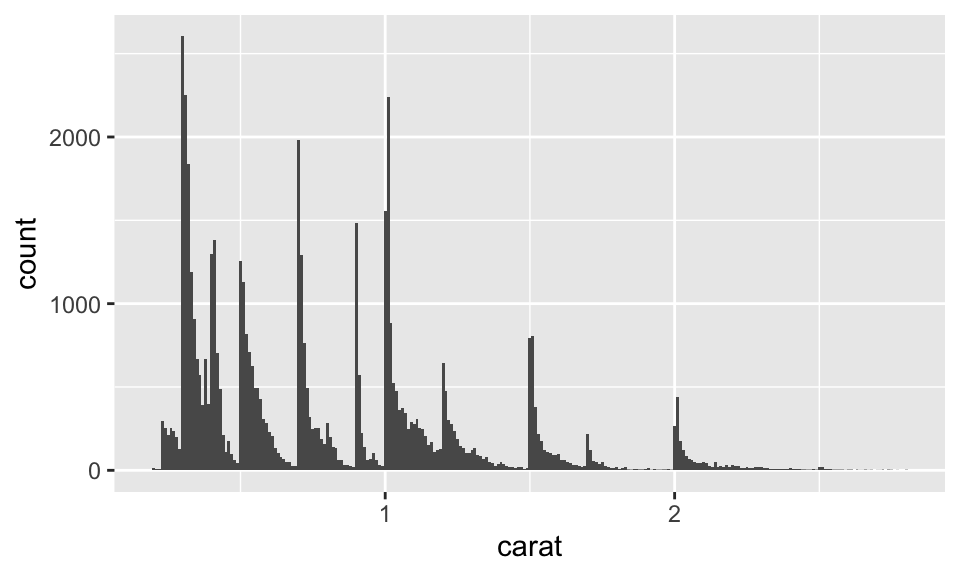
In both bar charts and histograms, tall bars show common values of a variable, while shorter bars show less common values. Gaps indicate values that do not appear in the data.
To turn this information into useful questions, look for anything unexpected:
Which values are most common? Why?
Which values are rare? Why? Does that match your expectations?
Can you see any unusual patterns? What might explain them?
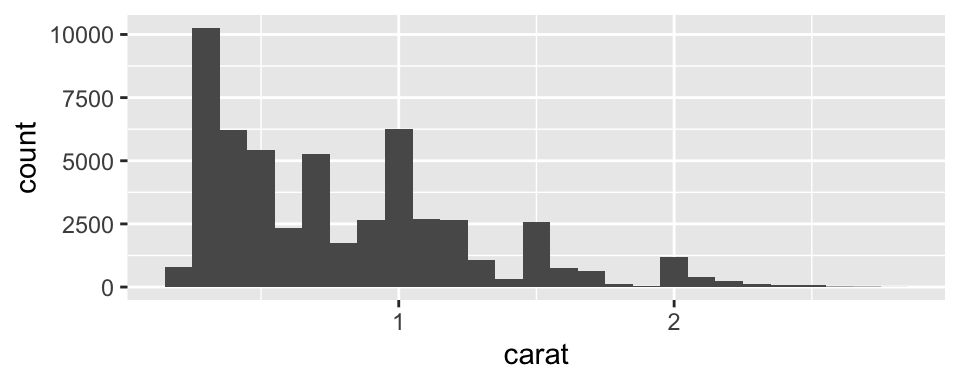
Example: Interpreting a Histogram
Look at the histogram below. What questions can you ask?
ggplot (data = smaller, mapping = aes (x = carat)) + geom_histogram (binwidth = 0.01 )
Example: Discussion
Why are there more diamonds at whole carats and common fractional values?
Why are there more diamonds just to the right of each peak than to the left?
Why are there no diamonds larger than 3 carats?
Unusual Values (Outliers)
Outliers are observations that are unusual; data points that do not seem to fit the overall pattern
Sometimes outliers are data entry errors; other times they may reveal important insights
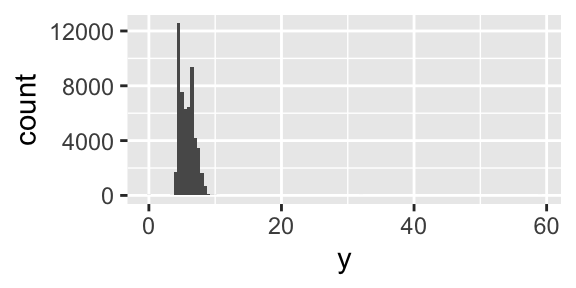
When you have a large dataset, outliers can be difficult to see in a histogram
ggplot (diamonds) + geom_histogram (mapping = aes (x = y), binwidth = 0.5 )
Visualising Outliers
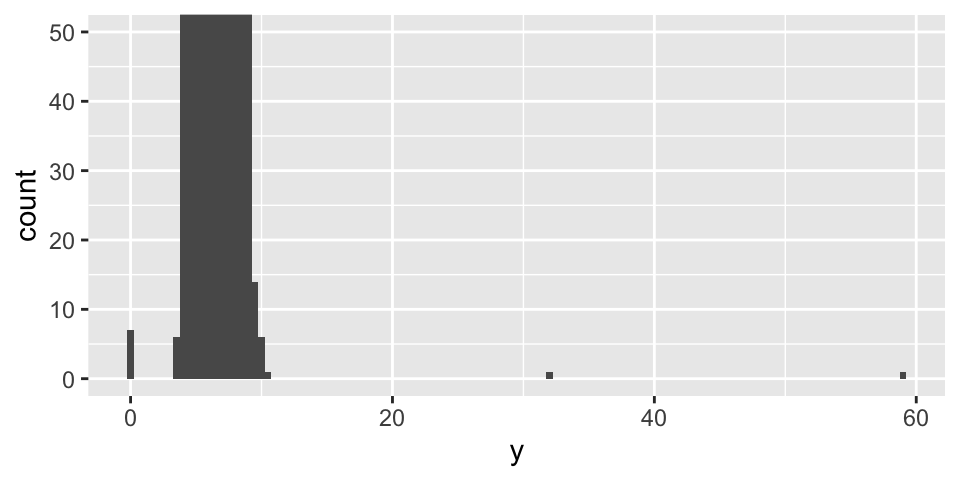
To make unusual values easier to see, we can zoom in using coord_cartesian(), often together with ylim() or xlim(), to restrict the axis ranges.
ggplot (diamonds) + geom_histogram (mapping = aes (x = y), binwidth = 0.5 ) + coord_cartesian (ylim = c (0 , 50 ))
Display Unusual Values
Extract them using dplyr.
What questions might you ask about these observations?
<- diamonds %>% filter (y < 3 | y > 20 ) %>% select (price, x, y, z) %>% arrange (y)
Deal with Outliers: Example
In the ‘Diamond’ example, the y variable measures one of the three dimensions of a diamond (in mm)
Diamonds cannot have a width of 0 mm, so these values must be incorrect
We might also suspect that measurements of 32mm and 59mm are implausible: such diamonds would be over an inch long, but do not cost hundreds of thousands of dollars
Deal with Outliers
Repeat your analysis with and without the outliers.
If they have minimal impact on the results and the cause is unclear, it is reasonable to replace them with missing values and proceed
If they have a substantial impact on your results, do not remove them without justification
Investigate the cause (e.g. data entry errors)
Clearly document any decisions to remove them in your analysis
Missing Values
If you encounter unusual values in your dataset and want to proceed with your analysis, you have two options:
Drop the entire row containing the unusual values (not recommended — why?)
<- diamonds %>% filter (between (y, 3 , 20 ))#diamonds2
Replace the unusual values with missing values (NA) using mutate() with ifelse() or case_when()
<- diamonds %>% mutate (y = ifelse (y < 3 | y > 20 , NA , y))#diamonds2
ggplot2 does not include missing values in plots, but it will display a warning that they have been removed
Covariation
If variation describes the behaviour within a variable, covariation describes behavior between variables.
Covariation is the tendency for two or more variables to vary together in a related way
The best way to identify covariation is to visualise relationships between variables.
We consider three common cases:
A categorical and a continuous variable
Two categorical variables
Two continuous variables
A Categorical and a Continuous Variable
Explore the distribution of a continuous variable across levels of a categorical variable
Use geom_freqpoly() (e.g. see frequency polygon example )
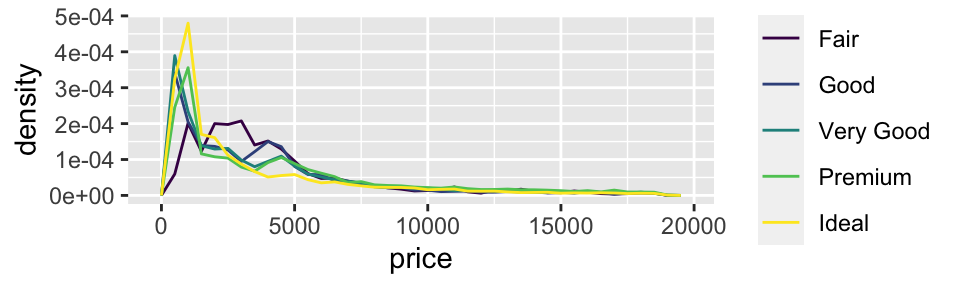
It can be difficult to compare distributions when overall counts differ substantially (e.g. see distribution of cut example ).
Instead of displaying counts, we can display density, where the area under each curve is standardised to one
ggplot (data = diamonds, mapping = aes (x = price, y = ..density..)) + geom_freqpoly (mapping = aes (colour = cut), binwidth = 500 )
Warning: The dot-dot notation (`..density..`) was deprecated in ggplot2 3.4.0.
i Please use `after_stat(density)` instead.
Boxplot
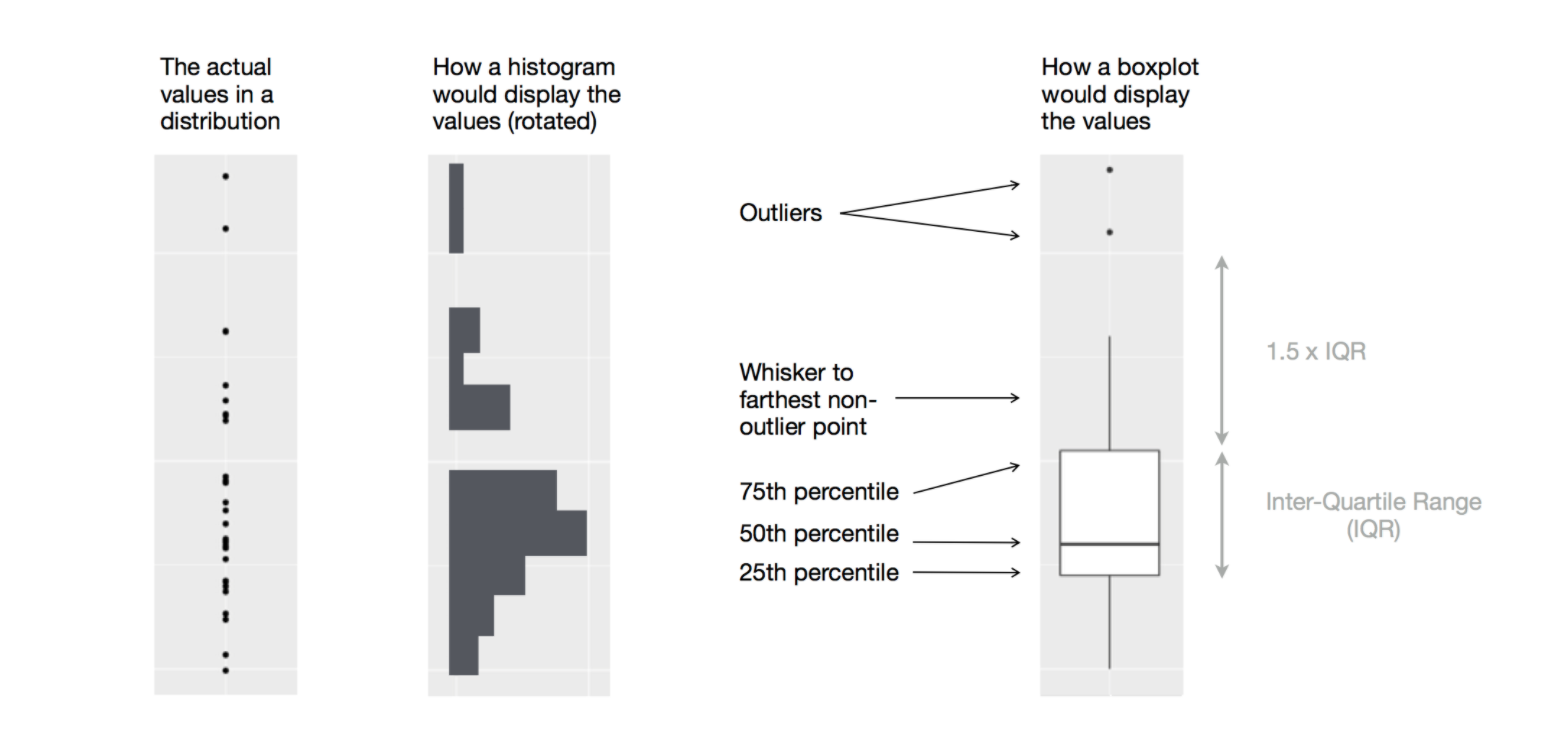
Another way to display the distribution of a continuous variable across categories is a boxplot .
Example: Diamond Prices by Cut
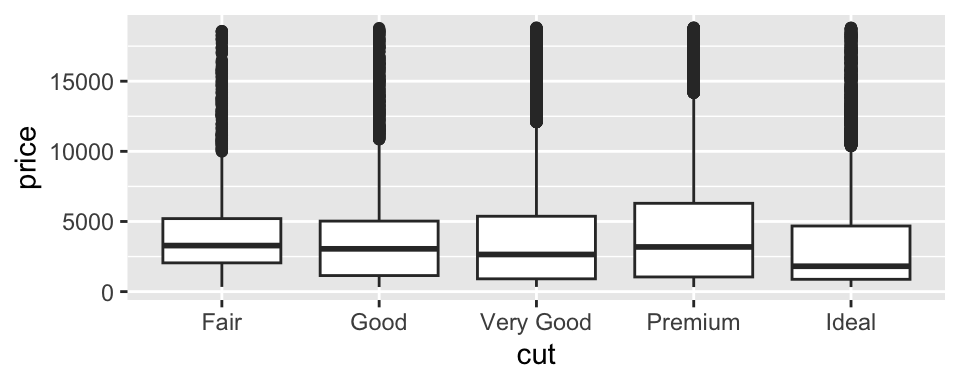
Examine the distribution of diamond prices by cut. What do you observe?
ggplot (data = diamonds, mapping = aes (x = cut, y = price)) + geom_boxplot ()
This suggests the counterintuitive finding that higher-quality diamonds are cheaper on average. Why might this be the case?
Example: Highway Mileage by Vehicle Class
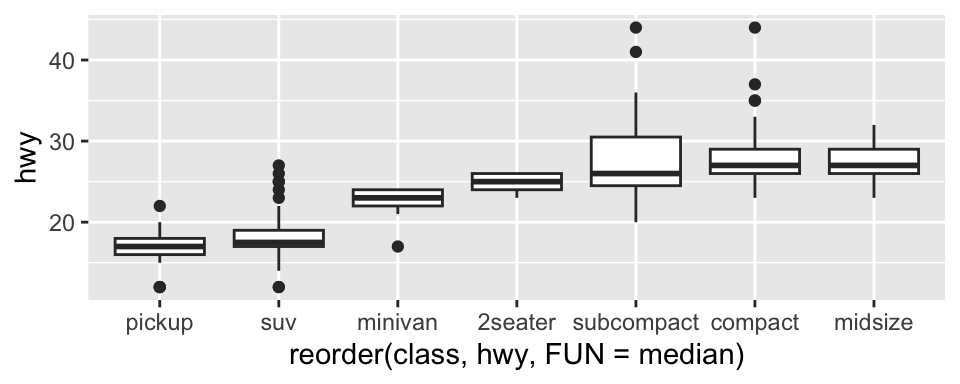
Consider the mpg dataset. We want to understand how highway mileage (hwy) varies across vehicle classes (class)
To make patterns easier to see, reorder class by the median of hwy using reorder(..., FUN = median)
For long variable names, geom_boxplot() may be clearer when flipped using coord_flip()
ggplot (data = mpg) + geom_boxplot (mapping = aes (x = reorder (class, hwy, FUN = median), y = hwy)) #+
Two Categorical Variables
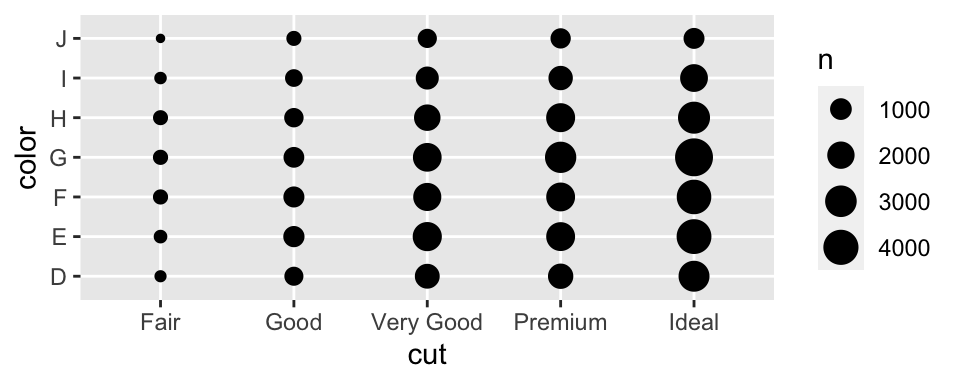
To visualise covariation between categorical variables, count the number of observations for each combination.
One approach is to use geom_count()
ggplot (data = diamonds) + geom_count (mapping = aes (x = cut, y = color))
Example: Computing Counts with dplyr
Another approach is to compute counts using dplyr
%>% count (color, cut)
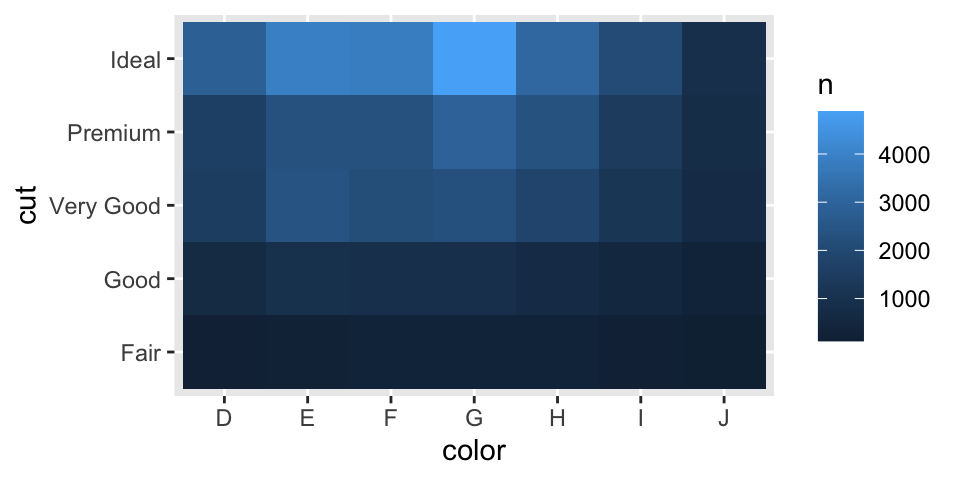
Example: Visualising Counts with geom_tile()
Then visualise the counts using geom_tile() with the fill aesthetic
%>% count (color, cut) %>% ggplot (mapping = aes (x = color, y = cut)) + geom_tile (mapping = aes (fill = n))
Two Continuous Variables
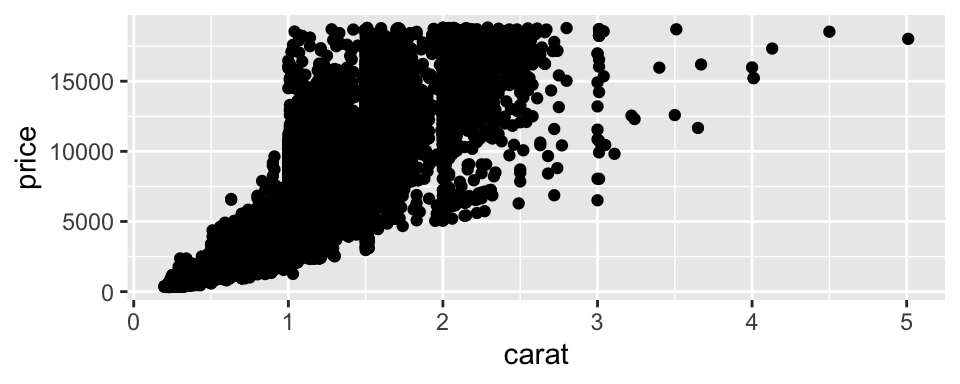
A common way to visualise the covariation between two continuous variables is a scatter plot using geom_point()
Covariation appears as patterns in the points
Example: visualise the relationship between carat size and price of diamonds
ggplot (data = diamonds) + geom_point (mapping = aes (x = carat, y = price))
Other Ways to Visualise the Relationship
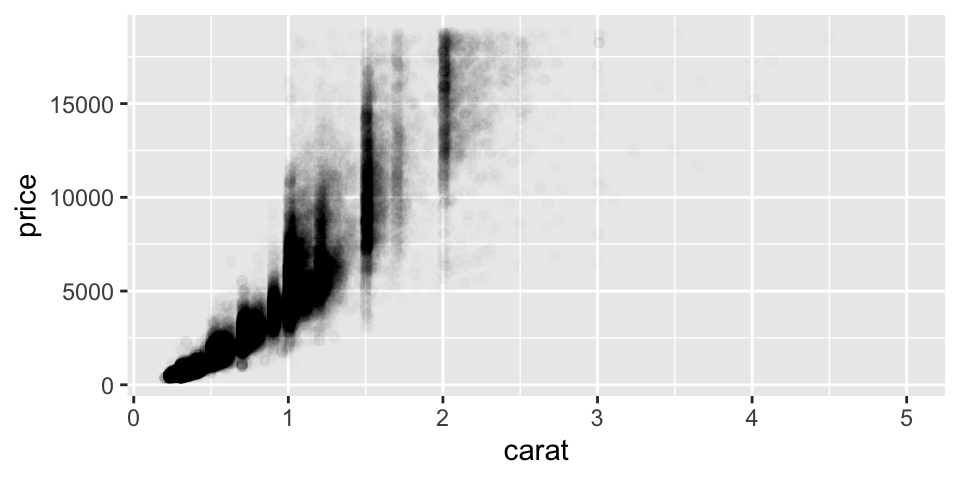
Use the alpha aesthetic to add transparency
Use geom_bin2d() or geom_hex() to bin observations in two dimensions
Bin one continuous variable so that it behaves like a categorical variable
Example: Add Transparency
ggplot (data = diamonds) + geom_point (mapping = aes (x = carat, y = price), alpha = 1 / 100 )
From Data Patterns to Models
Patterns in your data provide clues about relationships
Models are tools for extracting and formalising these patterns
References
Wickham, Hadley, Mine Çetinkaya-Rundel, and Garrett Grolemund. 2023. R for Data Science: Import, Tidy, Transform, Visualize, and Model Data . 2nd ed. O’Reilly Media.